
To add a website to your iPhone’s home screen, you can create a shortcut for the website using Safari:
- Open Safari and go to the website you want to add
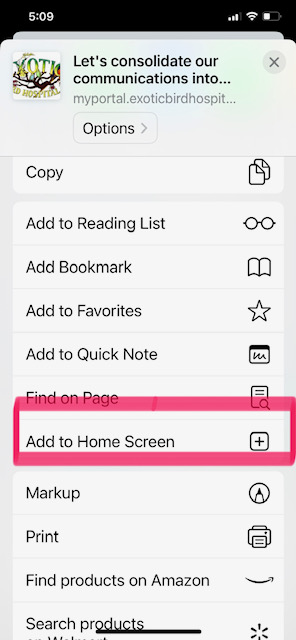
- Tap the Share button, which looks like a square with an arrow pointing out of the top
- Scroll down and tap Add to Home Screen
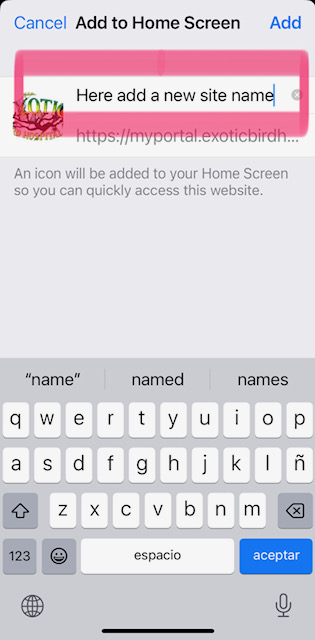
- Choose a name for the shortcut
- Tap Add in the upper right hand corner
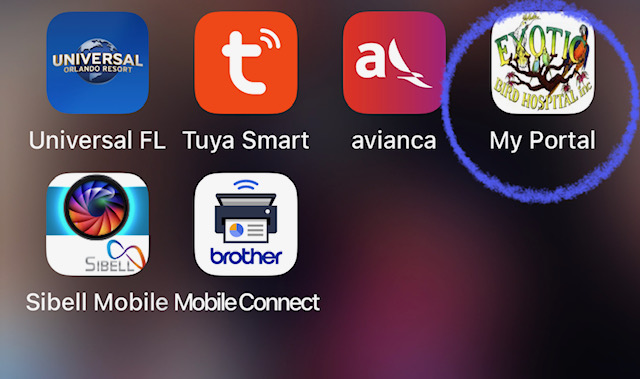
- Look for your link button on your Home screen
- Log in with your user credential, and you will stay on and receive notifications of new messages from coworkers.



3 Comments
Angela Leon
Mission Accomplished
Andres Gomez
👍🏼